Introduction
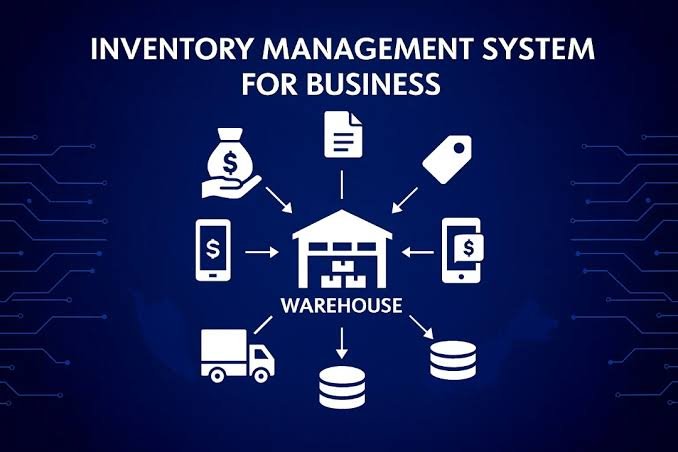
Inventory management is an essential part of running a successful business. Whether a company operates a retail store, warehouse, manufacturing facility, or e-commerce platform, keeping track of products and stock levels is crucial. Managing inventory manually can be time-consuming and may lead to errors, stock shortages, overstocking, and financial losses. This is where inventory software plays an important role.
Inventory software helps businesses monitor, organize, and control their stock in real time. By automating inventory-related tasks, companies can improve operational efficiency, reduce costs, and make better business decisions.
What Is Inventory Software?
Inventory software is a digital tool designed to track and manage products, materials, and stock throughout the supply chain. It allows businesses to record incoming and outgoing goods, monitor stock levels, manage warehouse operations, and generate inventory reports.
Depending on the software, it may also include barcode scanning, purchase order management, sales integration, supplier tracking, and automated stock alerts.
Inventory software can be used by businesses of all sizes, from small shops and online sellers to large enterprises with multiple warehouses.
Key Features of Inventory Software
1. Real-Time Stock Tracking
One of the most important features of inventory software is real-time stock tracking. Businesses can see how many products are available, where they are stored, and when stock levels change. This helps prevent stock discrepancies and ensures that accurate inventory information is available when needed.
2. Automated Stock Alerts
Inventory software can notify users when stock reaches a predefined minimum level. These alerts help businesses reorder products before they run out, reducing the risk of lost sales and customer dissatisfaction.
3. Barcode and QR Code Scanning
Barcode and QR code functionality makes it easier to identify products and update stock records. Employees can scan items during receiving, picking, packing, and shipping, reducing manual data entry and improving accuracy.
4. Purchase Order Management
Many inventory systems allow businesses to create and manage purchase orders directly within the platform. Users can track orders, monitor supplier deliveries, and maintain records of purchasing activities.
5. Reporting and Analytics
Inventory software generates reports on stock movement, product performance, inventory valuation, and sales trends. These insights help business owners identify fast-moving products, slow-moving items, and opportunities to improve purchasing decisions.
6. Multi-Warehouse Management
Businesses operating from multiple locations can use inventory software to track stock across different warehouses, stores, or distribution centers. This improves visibility and makes it easier to transfer products between locations.
7. Integration With Other Systems
Modern inventory software can integrate with accounting platforms, e-commerce websites, point-of-sale systems, shipping services, and enterprise resource planning (ERP) software. These integrations reduce duplicate data entry and help keep business information synchronized.
Benefits of Using Inventory Software
Improved Accuracy
Manual inventory records are vulnerable to human error. Inventory software automates calculations and records stock movements, helping businesses maintain more accurate inventory data.
Reduced Operational Costs
By identifying excess stock and minimizing unnecessary purchases, businesses can reduce storage expenses and the amount of money tied up in unsold products.
Better Customer Satisfaction
Accurate stock information helps businesses fulfill orders on time and avoid selling products that are unavailable. This contributes to a better customer experience.
Time Savings
Automating routine activities such as stock updates, purchase orders, and reporting allows employees to focus on more valuable tasks.
Better Decision-Making
Inventory reports provide useful information about demand, sales patterns, and product performance. Business owners can use this information to plan purchases and manage resources more effectively.
Easier Business Growth
As a business expands, managing inventory manually becomes increasingly difficult. Inventory software provides a more scalable way to handle additional products, suppliers, orders, and warehouse locations.
Types of Inventory Software
Different businesses have different inventory management requirements. The main types of inventory software include:
1. Standalone Inventory Software: This software focuses primarily on stock control, product records, and inventory reporting. It is suitable for businesses that need a dedicated inventory management solution.
2. Cloud-Based Inventory Software: Cloud-based systems allow users to access inventory information through the internet. They often support multiple users and locations without requiring businesses to maintain their own software servers.
3. Warehouse Management Software (WMS): A warehouse management system focuses on warehouse operations, including receiving, storage, picking, packing, and shipping.
4. Inventory Software With POS Integration: These systems connect inventory records with point-of-sale transactions, making them useful for retail stores and businesses with physical sales locations.
5. ERP-Based Inventory Software: Enterprise resource planning systems combine inventory management with functions such as accounting, procurement, production, and human resources.
6. Manufacturing Inventory Software: This type helps manufacturers track raw materials, components, work in progress, and finished goods.
How to Choose the Right Inventory Software
Selecting the right inventory software requires careful consideration of a company’s needs, budget, and future plans.
First, identify the main inventory challenges your business faces. These may include inaccurate stock counts, frequent stockouts, complex warehouse operations, or difficulties managing online and offline sales.
Next, evaluate the following factors:
- Ease of use: Choose a system that employees can learn and operate efficiently.
- Essential features: Make sure the software supports your inventory processes, including tracking, reporting, purchasing, and stock alerts.
- Integration capabilities: Check whether it works with your existing accounting, sales, and e-commerce systems.
- Scalability: Select a solution that can accommodate future business growth.
- Cost: Consider subscription fees, implementation costs, training, support, and any additional hardware requirements.
- Security and data backup: Look for appropriate access controls, data protection measures, and reliable backup options.
- Customer support: Reliable technical support can help minimize disruptions and resolve problems quickly.
Before making a final decision, consider testing a free trial or requesting a demonstration. This allows your team to determine whether the software fits its daily workflow.
Popular Inventory Software Solutions
Several inventory management platforms are available, each designed for different business requirements.
- Zoho Inventory: Suitable for small and growing businesses that need stock tracking, order management, and sales channel integration.
- Odoo Inventory: Part of a broader business management platform that includes applications for accounting, sales, purchasing, and manufacturing.
- Cin7: Offers inventory and order management capabilities for businesses managing products across multiple sales channels.
- inFlow Inventory: Designed to help small and medium-sized businesses manage stock, purchasing, sales, and warehouse activities.
- SAP: Provides inventory management capabilities within a broader enterprise software ecosystem, particularly for organizations with complex operations.
- Oracle NetSuite: Combines inventory management with broader business functions, including financial management and order processing.
The best option depends on the company’s size, industry, budget, integrations, and operational complexity. Features and pricing should be checked directly with each provider before purchasing.
Challenges in Inventory Management
Although inventory software offers many advantages, businesses may encounter challenges during implementation.
One common challenge is inaccurate initial data. If existing stock records contain errors, transferring them into a new system can create problems. Businesses should conduct a physical stock count and clean up product records before implementation.
Another challenge is employee training. Staff members need to understand how to record stock movements correctly and follow consistent procedures.
Integration with existing systems can also require planning, particularly when a business uses several sales channels or operates multiple warehouses.
To address these challenges, companies should establish clear inventory procedures, train employees, test the software before full deployment, and regularly compare system records with physical stock.
Future Trends in Inventory Software
Inventory management technology continues to evolve. Artificial intelligence and predictive analytics can help businesses forecast demand, identify unusual stock patterns, and improve replenishment planning.
Automation and connected scanning devices can reduce manual work in warehouses, while cloud-based platforms make inventory data accessible across locations.
The use of real-time analytics, automated purchasing recommendations, and integrated supply chain systems is also helping businesses respond more quickly to changes in customer demand.
As these technologies develop, inventory software is likely to become an increasingly important tool for improving supply chain visibility and operational efficiency.
Conclusion
Inventory software is a valuable solution for businesses that want to manage stock more accurately, reduce operational costs, and improve customer service. Its features, including real-time tracking, automated alerts, barcode scanning, purchase order management, and reporting, help simplify inventory operations.
Choosing the right software requires an understanding of business requirements, available features, integration needs, and long-term growth plans. With proper implementation and regular monitoring, inventory software can help businesses maintain better control over their stock, make informed decisions, and build a more efficient operation.
In today’s competitive business environment, effective inventory management is not just about counting products. It is about using accurate information and modern technology to improve productivity, control costs, and support sustainable business growth.